§ 02 · The core formula
Intake. Processing. Result.
Three steps, one matter. What you put in, what UNOY does, what comes out. Everything documented.
Intake
147 emails · Clients
Intake.
Your documents, files, emails, and tickets — as they arrive.
Processing · running
Processing.
Analysis, review, AI draft, sign-off. Audit trail at every node.
Result
147 case files · ready
Result.
Structured, validated, approved. Ready for handover or output.
§ 03 · Transformation 1
Legal work: high-volume matters.
Matter · Legal · Mass claim
147 emails become 147 case files.
Clients send documents for a high-volume matter. UNOY classifies, checks completeness, extracts the facts, reviews the claim, and files each matter in a structured format. With source references and a recommended action. Legal responsibility remains with the qualified professional.
Faster grounding, safer handover.
§ 04 · Transformation 2
Insurance: claims processing.
Matter · Insurance · High-volume claim
Claim reviewed. Decision ready.
At FairPlane, thousands of flight delay claims run through UNOY. EU 261/2004 is the governing framework. The AI handles language and classification; the workflow handles mandatory review. Decisions arrive in minutes rather than days.
Many cases, clear rules, audit trail throughout.
§ 05 · Transformation 3
Knowledge product: interactive advisories.
Matter · Chamber · Member service
Regulatory frameworks become ongoing advisories.
At the WKO, specialist publications become interactive 24/7 advisories. A member asks a question. UNOY classifies it, retrieves the relevant legal basis, and formulates the answer with source references and current status. Scales to 600,000 member businesses.
Many services, one system, consistently citable.
Workflow · Information mechanics
1. Capture intake · Classification
2. Required data + RAG lookup
3. AI generation + validation
4. Sign-off: data protection role
5. Output + audit trail recorded
6. Feedback into skill library
Component overview
4 building blocks in detail
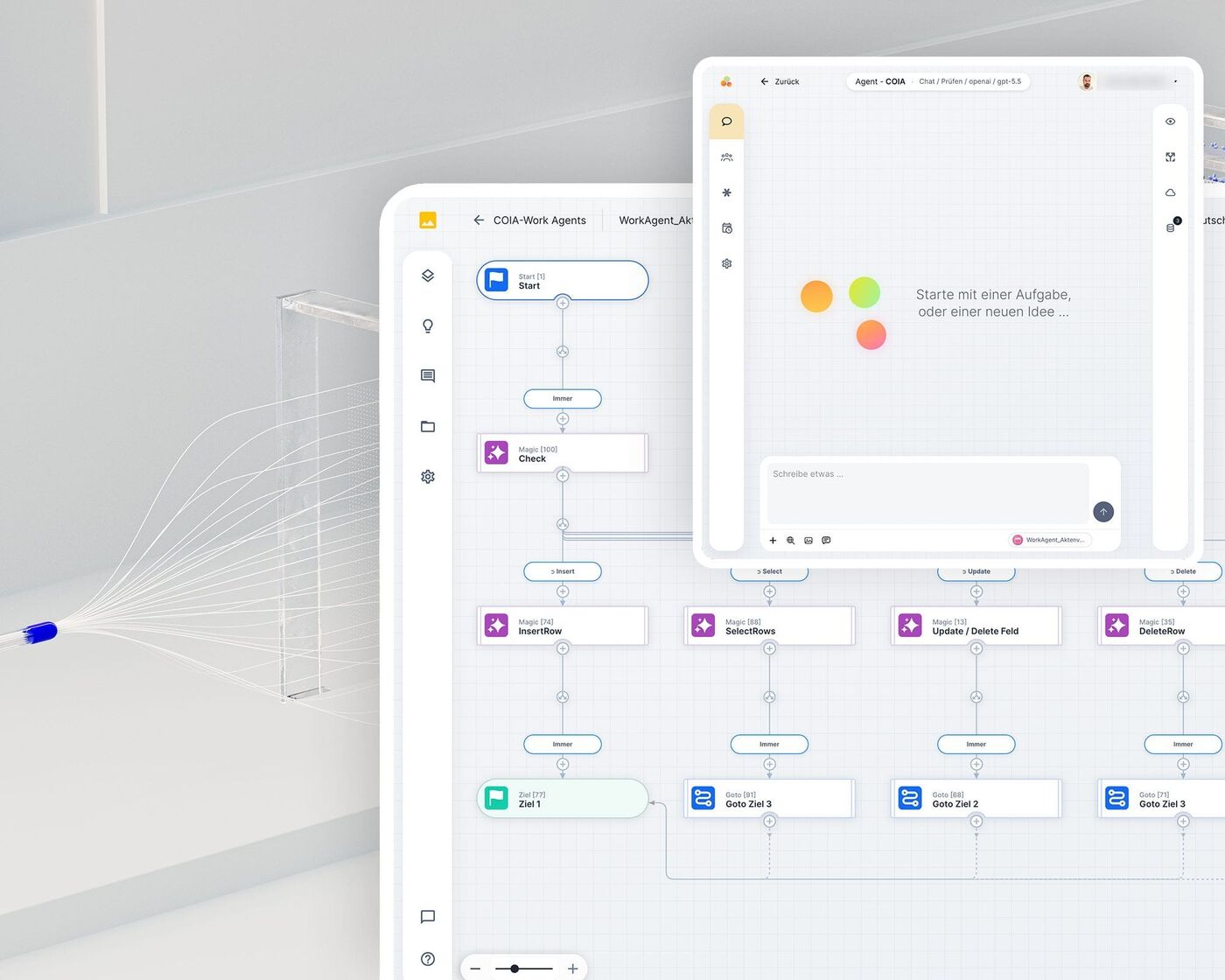
COIA coordinates all steps in the correct sequence. When a node fails, there are fallback paths and escalation.
§ 06 · For technicians
What happens internally.
UNOY orchestrates specialized components into a single matter. What you see is only intake and result. Those who want to go deeper will find the four main building blocks here.
COIA coordinates all workflow nodes, calls AI functions only where language is needed, and passes results forward in a structured way.
Each work step runs on its own component: classification, extraction, RAG lookup, generation, validation.
All results are checked against RAG sources, regulatory frameworks, and mandatory fields before sign-off.
Every step with timestamp, actor, source, and model version. Reproducible and traceable for supervisory bodies and audits.
§ 07 · Frequently asked
What you might ask.
Six questions about the mechanics that come up most often in demo conversations.
Do I need to understand how UNOY works internally? +
No. That is the whole point: you put work in and get a result out. You can ignore what happens internally. If you are curious, see the "For technicians" section above.
What happens if UNOY cannot process something? +
It is documented and you are notified. You can then decide: handle it manually, or adjust the workflow? There is no black box — you always see where it got stuck.
How long does processing typically take? +
It depends on task complexity. Simple processing takes seconds to minutes. Complex analyses can take hours. For bulk processing (100+ files) UNOY works in parallel, so 147 cases do not take 147 times as long as 1 case.
Can I customize the process? +
Yes. Every workflow is configurable. You can add or remove steps, change the sequence, or set conditions — all without code. Our team supports you with more complex changes.
Who has access to my data during processing? +
Only UNOY systems. Your data runs in isolated, encrypted environments. No manual access, no external partners. After processing, data is deleted or archived according to your specifications — fully GDPR-compliant.
Can I see what UNOY has done? +
Yes. Every step is fully documented. You can see what the inputs were, which steps were executed, which decisions were made. The audit trail is fully viewable and traceable.
§ 08 · Next step
See it with your own case.
Bring a concrete matter. We show how it runs through the mechanics and which delivery model (Self, Co-Build, Delivery) fits.
Intake · Processing · Sign-off · Audit trail